
 Photoshop
 Maya
Maya ZBrush
 Houdini
 Unreal Engine
 Substance Painter
 Blender
 Nuke
Nuke Arnold
 V-Ray
V-Ray Substance Designer
 Mari
Mari Marvelous Designer
 Marmoset Toolbag
 3ds Max
 3DCoat
 Redshift
 After Effects
 Faceform Wrap
 Lightroom
 OctaneRender
 SpeedTree
 Daz 3D
 Agisoft Metashape
 Fusion
 Modo
Modo RealityCapture
 Gaea
Gaea Cinema 4D
 Gravity Sketch
 Premiere
 Procreate
 SketchUp
 SketchBook
 Quixel DDO
 Katana
 Krita
Krita Natron
 Quixel Bridge
 Quixel Megascans
 Quixel Mixer
 Mudbox
 World Creator
 Yeti
Yeti Ziva VFX
 Mixamo
 Adobe Medium
 SynthEyes
 Clip Studio Paint
 Unity
Unity Gaffer
 xNormal
 TreeIt
 Meshmixer
 Massive
 Materialize
 DaVinci Resolve
 Ornatrix
 PreForm
 Corel Painter
 Moi 3D
 QuickTime
 World Machine
 animBot
 ReCap
ReCap Storyboard Pro






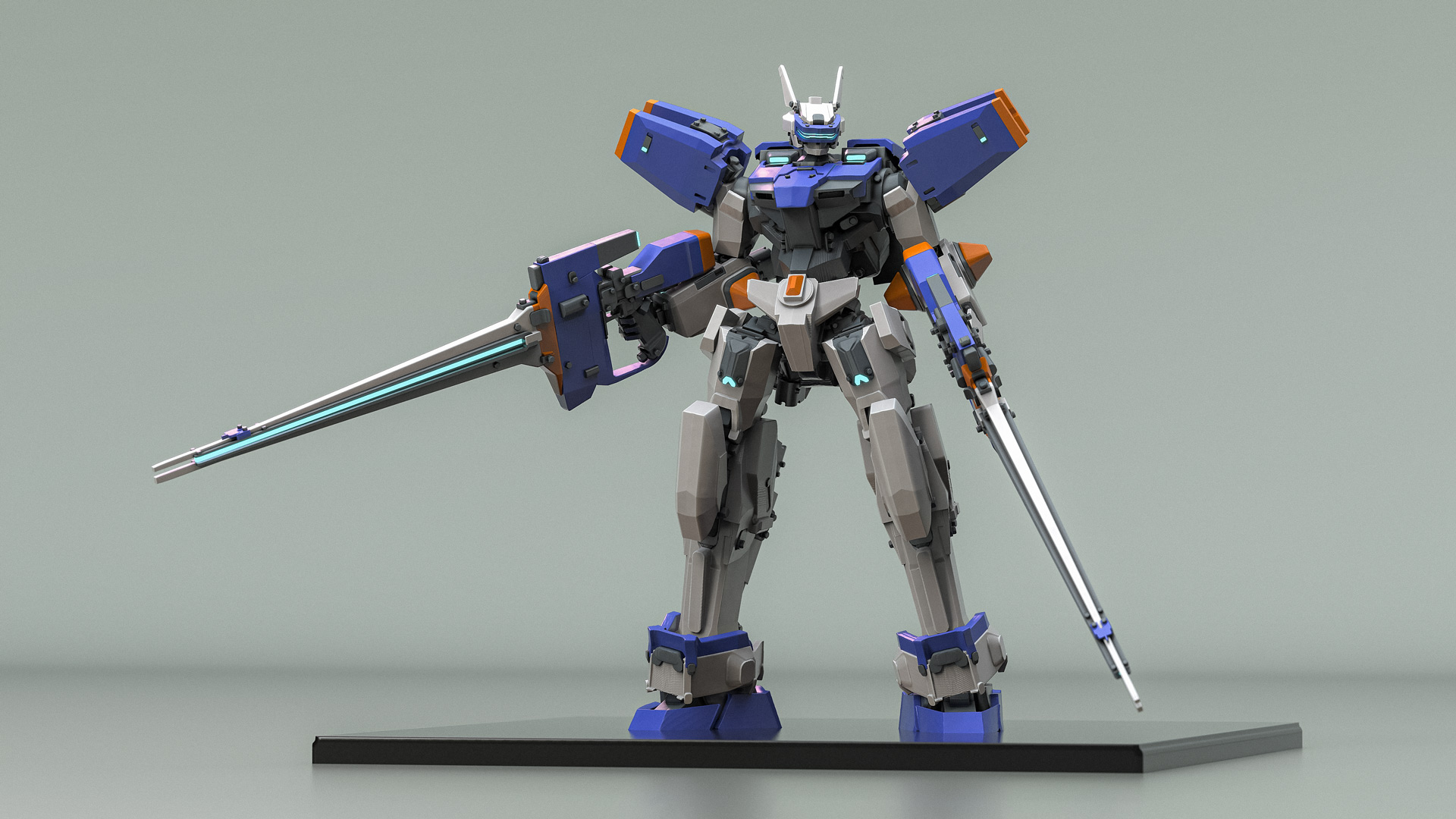


In this concise workshop, Senior Concept Artist Andre-Lang Huynh demonstrates his complete workflow for designing and sculpting a mech from scratch using Adobe’s Substance 3D Modeler. Created for concept artists, hard-surface artists, and anyone interested in VR sculpting, Andre’s workshop focuses on the design process for developing strong mechanical concepts and showcases how virtual reality can be integrated into a professional production workflow.
Beginning with simple geometric forms, artists will learn how to establish clear proportions, silhouettes, and shape language before gradually building complexity through secondary and tertiary forms, articulation, armor plating, color, and surface detail. Rather than simply demonstrating software features, each stage of the project is approached from a design perspective, with an emphasis on explaining the reasoning behind every major decision.
Along the way, artists will discover many of Substance 3D Modeler's core tools and features, including primitive shapes, sculpting brushes, booleans, layers, materials, stamps, symmetry, angle snapping, and reusable kitbash elements. The workshop also explores how VR can be used to rapidly iterate on ideas, evaluate forms from every angle, and maintain a fast, intuitive workflow throughout the design process.
Once the sculpt is complete, Andre moves into KeyShot, where he shows how to export the model, use Material IDs to quickly assign materials, build a simple lighting setup, and produce polished presentation renders.
By completing the workshop, artists will have a completed mech design and a practical workflow applicable to a wide range of hard-surface and concept design projects.
Project files include the completed Substance 3D Modeler scene, allowing artists to examine the final sculpt, study the project's organization, and follow along with the techniques demonstrated throughout the workshop.
3 Lessons
This workshop begins with an introduction to Andre-Lang Huynh’s overall workflow before he jumps into the initial blockout. Starting with simple geometric forms, he shows how to establish the mech's proportions, silhouette, and overall design language while becoming familiar with Substance 3D Modeler's core sculpting tools. Throughout the lesson, his focus is placed on shape hierarchy, iteration, and the design decisions that drive the project.
Duration: 11m 41s

With the primary forms established, Andre’s second lesson focuses on refining the design by introducing secondary and tertiary shapes, articulation, armor plating, color, and mechanical details. Artists will also learn how to use reusable stamps, kitbash elements, Material IDs, and other workflow techniques to efficiently add complexity while maintaining a clear and readable design.
Duration: 16m 40s

The final lesson in this short workshop covers exporting the completed sculpt to KeyShot and preparing it for presentation. Artists will learn how to use previously assigned Material IDs to quickly assign materials, build a simple lighting setup, adjust cameras and render settings, and create polished presentation images suitable for portfolios, client work, or personal projects.
Duration: 2m 59s

Primary tools
For this workshop you’ll need:


* Note that these programs and materials will not be supplied with the course.
Project Files
When you download the workshop files, you'll get access to Andre-Lang Huynh’s completed Substance 3D Modeler scene, allowing artists to examine the final sculpt and study the project's organization. Inside, you'll find:
MechNuggets Project — Andre’s final Substance 3D Modeler mech sculpt for artists to study and follow along with the techniques demonstrated.
Skills Covered
Who’s this Workshop for?
This workshop is aimed at intermediate to advanced concept artists, hard-surface artists, and 3D designers who want to incorporate VR into their concept design workflow. While some familiarity with 3D art fundamentals is recommended, previous experience with Substance Modeler is not required, as the tools and workflow are introduced throughout the project.
Artists with a background in traditional concept art, digital sculpting, or industrial design will benefit from the design principles discussed, including shape language, visual hierarchy, proportion, iteration, and efficient decision-making. The techniques demonstrated can be applied to a wide range of hard-surface subjects beyond mechs.
Learning Outcomes
By completing this workshop, artists will feel confident using Substance 3D Modeler to concept and sculpt mechanical designs with a practical workflow that can be applied to a multitude of hard-surface and concept design projects.
Artists will learn how to:
- Design a mech from simple geometric forms using a structured, production-oriented workflow.
- Build stronger silhouettes through shape language, proportion, and visual hierarchy.
- Use Substance 3D Modeler's core sculpting tools to rapidly iterate and refine mechanical designs.
- Create reusable stamps and kitbash elements to speed up detailing and improve consistency.
- Apply color, surface detail, and articulation to create believable hard-surface designs.
- Develop a practical VR concept design workflow applicable to hard-surface and mechanical projects.


